
Frequently Asked Questions
When will my order be shipped?
For Personal Orders, items will ship within 2 business days after order has been placed. For Business Orders, items will ship within 2 business days once approved by your manager.
How much will the shipping cost be for my order?
Ground shipping is free for orders placed on the Company Store. There is the option for Express shipping if you need the order faster. You are responsible for Express shipping fees.
Where is my order being sent from?
All of our orders are shipped from our warehouse in Richmond, Virginia, US
Will I need to sign for my order?
All orders will ship via FedEx and signature will not be required.
How long will it take for my order to reach me?
This can vary depending on where the delivery is being made to. Estimated delivery times will be displayed to you at checkout. If delivery time is critical, we recommend paying extra for Express shipping (2 day or overnight).
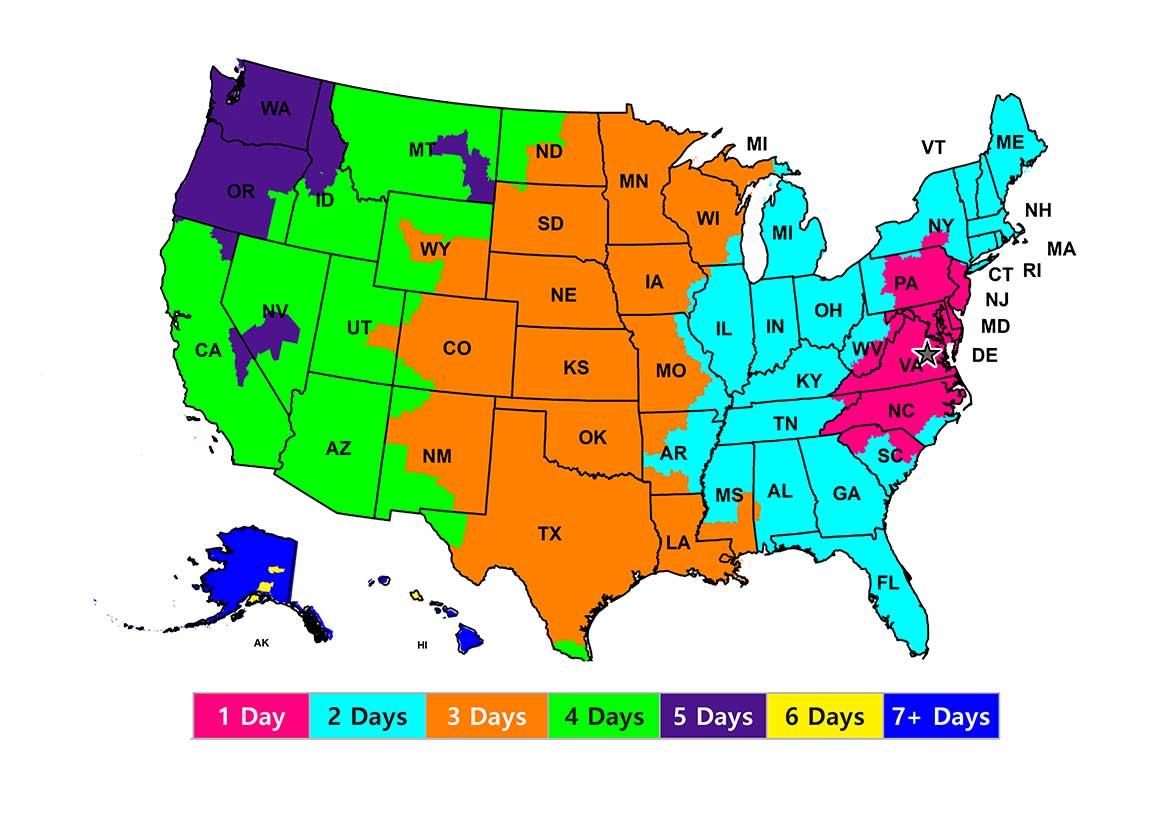
Will there be any additional costs to pay on receipt of my order?
No. Where applicable, any import duties payable on import should be charged back to us through the carrier service we use. If you’re being asked to pay anything on import, please contact us at the helpdesk and we’ll support the clearance process.
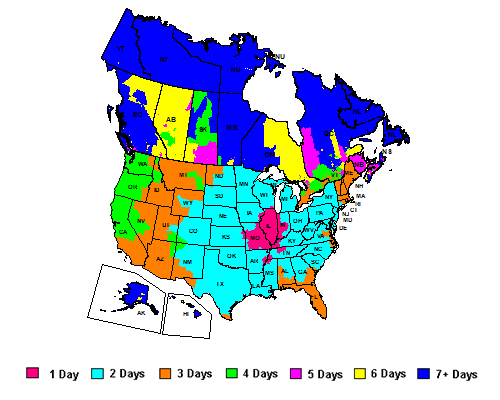
I'm in Canada, how long will my delivery take?
Shipping times to Canada are approximate and based on normal customs clearance.
What are the ship to methods for Hawaii and Alaska?
We are unable to ship via Ground to Hawaii and Alaska so these locations will automatically be shipped via FedEx Express at no additional cost to the employee.
How do I change the shipping address for my order?
How do I find out the status of my order and tracking information?
Order status and tracking information can be found by viewing your Order History then clicking on the order number.*
*Orders placed prior to April 1, 2024 will not reflect in your Order History
What happened to my Order History?
Due to system changes, orders that were placed prior to April 1, 2024 will not reflect in your Order History.
How do I exchange or return an item?
We are happy to accept returns within 90 days, as long as the items are in unused re-saleable condition. Please complete the form linked below to return your item and get a refund.
How do I cancel my order?
My item is damaged on receipt/has developed a fault. What should I do?
All merchandise is guaranteed for workmanship and quality for 90 days from date of purchase. If for any reason you are not satisfied, email us at customerservice@brandito.net and we will arrange a refund/replacement for faulty goods. If you could include your order number, a brief description of the fault and a digital photo of any visible issues when getting in touch, it will help us to resolve the problem as quickly as possible.
What if my package is lost or stolen?
ServiceNow and BRANDITO will not be responsible for costs due to theft or lost packages once confirmed delivery has been made.
Can I pay with cost center?
No, to allow for better tracking and management of company spending, we have removed the cost center payment option from the Company Store sites. Going forward, you will be able to pay using a credit card (personal or corporate), a gift code or a Purchase Order. PO is required for any purchases over $10k.
Can I use multiple credit cards to pay for an order?
No, we ask that you use a single credit card when paying for an order.
Why am I being asked if my order is a personal or business purchase?
We have a Surf approval workflow, much like the current PO process. The approval process will be used by the Finance & Strategic Sourcing & Procurement teams to better monitor & manage enterprise-wide spend.
At checkout, users will be prompted to note if their order is a business or personal purchase. If a business purchase is selected, employees will also be prompted to select a business purpose from a dropdown (event, award or recognition, etc.). After a business purpose is selected, the user will continue the checkout process as normal.
Following checkout, a Surf approval workflow will begin and will be routed to an employee’s direct manager to approve or deny the purchase. If personal is selected, no approval will be necessary.
What is the difference between a business and a personal purchase?
A business purchase is any purchase that has a business justification and can be expensed through Concur.
I placed a business purchase, why am I being asked for a business purpose?
The “business purpose” field is included as part of the Surf approval process and will be shared with your manager to review before approving or denying the order request. It will also be used by the Company Store team to better understand the merchandise needs of our employees & teams, as well as the timing of those needs, so that we can better build our merchandise offering and release schedule in the future.
Does a business purchase require a manager’s approval?
Yes. If an employee selects a “business purchase” a SURF approval workflow will begin. Once check out is complete, the employee’s direct manager will receive a Surf notification to “Approve” or “Reject” the purpose.
How will my manager be notified to “Approve” or “Deny” the purchase?
Once an employee completes a business purchase, their direct manager will immediately receive a notification to “approve” or “deny” the purchase from the Surf team. If no action is taken by the manager, a reminder email will be sent to the manager 2 days after the purchase. If no action is taken by the manager, a final reminder email will be sent 4 days after the purchase.
If no action is taken by the manager after 5 days, the order will be cancelled & the employee will need to re-submit the order. If the order is cancelled due to inactivity by a manager, the order will not be processed, and the employee will not be charged.
What if my manager rejects the purchase?
If the manager rejects the purchase, the order will be cancelled, the employee’s order will not be processed, and the employee’s card will not be charged.
It is the responsibility of the employee to remedy any issues leading to the rejection with their manager directly & they will be required to re-submit the order through the Company Store.
What happens if my manager approves the purchase?
Once an order is approved by the manager, the employee will receive a notification of approval from Surf, the order will be processed, and the employee’s card will be charged.
After the order is processed, the employee will receive an order confirmation email, as well as a shipping notification, including tracking information, once the order has shipped.
Can I pay in another currency?
Our site only offers pricing in US Dollar. If you are purchasing with a card in another currency, a conversion fee may be applied by your financial institution.
How do I open a PO (Purchase Order)?
To open a PO (Purchase Order) at ServiceNow, you’ll need to open a PR (Purchase Request) first. To learn more about opening a PR, see this Knowledge Base article.
How do I purchase gift codes?
Head to the gift code page located at the top of the home page – here you can add gift codes to your basket. If you want to buy gift codes in bulk or in different value denominations, please submit a request.
I’m looking to give gift codes to employees in other regions. How do I do this?
Gift codes can only be used at the store they are bought from (AMS, EMEA, APAC & Japan or India). To give a gift code to a colleague in a different region you can click on the globe icon top right on the store, navigate to a different region and follow the steps above to make a colleague very happy.
If you require a larger number of gift codes across multiple regions, contact the store helpdesk which is local to where you are located, and we can coordinate issuing those.
How do I redeem gift codes?
Locate the 16 digit gift code number on the e-mail or gift card you received. To redeem your gift code please follow these simple steps.
- During the checkout process you will be prompted for a payment. You will type your gift code number on this page. You will need to choose a payment method along with providing your gift code number in case your gift code does not cover all of your charges.
- Under the section titled “Pay By Gift Code” please type in your 16 digit gift code number in the box provided. If you have more than one gift code to redeem click the “Add Another Gift Code” link to the right to add another box. You can redeem up to 7 gift code on one order.
- Click Continue once you have added all of your gift code numbers to checkout. The review order screen will show the amount of gift codes that are to be applied to this order.
I need to purchase multiple gift codes for my team. Do I have all the codes sent to me to distribute, or would they go directly to the employees?
Gift codes are distributed directly to recipients by our Company Store vendors for tracking and customer support purposes.
Will my gift code balance carry over for use on future transactions?
Yes! Gift codes expire after 24 months so be sure to use your balance.
Can I use multiple gift codes on one purchase?
Yes! You can use multiple gift codes in one purchase. If an order total is over the balance of your gift code(s), you will be prompted to complete payment using a credit card.
Does my gift code expire?
Yes, gift code balances expire 2 years from date of issue, where permissible under applicable law. The expiry date of any gift code is clearly displayed on the gift code voucher itself, which will be emailed to recipients.
Note that the gift code is nontransferable and nonrefundable and can only be spent on Company Store site purchases.
If I purchase a Company Store gift code for an employee on my team and use my ServiceNow credit card, would I expense it as taxable or non-taxable? Would I need VP approval to purchase the gift?
Any expensed purchase (not personal purchases) from the Company Store – including gift codes, is Employee Recognition Non-Taxable, and if it is not for a life event, requires SVP+ approval. Please refer to this Knowledge Base article for more information.
Why am I being asked to “Register My Account?”
All ServiceNow users are required to register in order to enjoy the full experience of the platform. You will only be asked to register once per regional store.
Can I shop at any regional store site?
Yes! Employees can browse, shop & ship in any of the four regions (AMS, EMEA, APAC & Japan, & India) by using the globe icon in the top right corner of the site.
Can I ship items from one region to another region?
Unfortunately, no. Please be sure to only ship to locations within the region where you are shopping.
I want to place a special order? How do I get started?
To get a special order project started, please visit the “Custom Orders” page from the navigation menu. Once submitted, a member of the Company Store team will reach out within 3 business days to set up a kickoff meeting.
Why has some pricing changed since my last visit?
All prices are subject to change without notice. The prices shown in this online catalog supersede all previous catalogs. We also reserve the right to correct misprints.
Who determines what items are offered on the site?
Why did my cart price increase at checkout?
As required by law, applicable sales taxes are added at checkout stage, dependent on your final delivery destination.
I want to order something which is out of stock – what should I expect?
We make every effort to keep all items in stock. However, occasionally some items may be temporarily out of stock. We will update the product descriptions to give ETAs of when we expect more inventory. Please visit the site again at that time to place your order once inventory is available. You can also contact customerservice@brandito.net to receive an email as soon as the item is back in stock. When you contact us please let us know the quantity needed and if there is a date you need the item(s) by so we can help you plan accordingly.
When will I receive confirmation from my order?
If you provided an email address a confirmation will be emailed to you within 15 minutes of placing your order.